
No doubt, computer science skills are important for anyone to survive in this age and time. Science, Technology, Engineering, Mathematics, and Arts have taken over all aspects of society, including family and work.
Basic knowledge of a computer is a necessary skill which is not only limited to adults but kids as well. Every day, more kids are introduced to the world of coding and computer science. Coding and computer science are two mutually inclusive skills- you need one to learn the other.
This article will guide you through all you need to know about getting the best computer keyboards for your kids.

All About Kids Keyboards
Getting a keyboard specifically made for kids will allow parents and teachers need to teach children the rudiments of a keyboard and how it works. Keyboards for kids have an attractive colored interface designed to their tastes.
The letters are also distinguished to make it easier for kids to identify. All these, among other interesting factors, distinguish the kids’ keyboards from the rest.

Overview of Typing Keyboards for Kids
The keyboard is a solid backbone of the computer, and kids can perform several functions with the keyboards for kids. They can learn how to type, code, press keys on the computer, draw, etc.
Choosing the best computer keyboards for kids can be a bit of a herculean task, as the keyboards are programmed differently and for specific age groups. With the right keyboard, kids can learn about their colors, symbols, and various computer keys such as enter key, alt key, backspace, tab, among others.
Factors to Consider when choosing a computer keyboard for kids
There are various factors to look out for before getting a customized kids' keyboard. They include the following.
Age
The best typing keyboards for kids are designed to fit into specific age groups. The kind of keyboards for kids between the ages of 3 and 6 are different from those fit for kids aged 7 and above.
It is important to note, however, that some keyboards for kids are versatile and can serve kids of all ages.
Kids’ Preferences
Parents of older kids should consider this factor before choosing a keyboard for their kids. Some keyboards have popping and bright colors, while others have simpler and cooler colors. Knowing your kids’ tastes will help you choose the perfect keyboards for them. Alternatively, you can select a couple of keyboards and allow your kids to choose the one they want.

What to Look For in Typing Keyboards for Kids
To get the best typing keyboards for kids, there are certain things you need to look out for.
Keyboard Layout
This is the first factor to look out for when purchasing a keyboard for kids. Some keyboards have similar setups with normal adult keyboards and this might be difficult for beginners or younger kids between the ages of 3 and 5 to type and get accustomed to.
You should endeavor to pick a keyboard layout based on your kids' age and level of expertise.
Key Switches
A keyboard key switch is the “click-tick” sound that you hear when you press a key on the keyboard. If your kid is easily distracted, then you should consider using a silent key switch. Again, choosing a key switch depends on various factors, one of which includes your kid’s preference.
Size
Just like any standard keyboard, keyboards for kids are in different sizes. Fully sized keyboards have all the complete features of an adult keyboard. Ideally, the bigger the size of the keyboard, the more keys your kids would have access to.
For complete beginners and kids below 7 years of age, a smaller-sized keyboard is recommended. Small keyboards will grant kids access to the primary keys and they can perform almost any function with them.
Splash Resistance
Kids tend to spill food and water on the keyboard, and non-spill-resistant keyboards can cause major damage to it. To avoid damage to your kid’s keyboard, you can opt for newer keyboard models which are built with rubber walls to lessen the effects of foreign elements (food, water, etc.) on the keyboard.
Performance
The best kids' keyboards aren’t those with the most beautiful visuals or expensive prices. To ensure you get the best typing keyboards for your kids, you should consider their performance and durability before purchasing. When checking for a keyboard’s performance, the price and visuals do not matter. Instead, you should look out for its key features, functionality, and size.
Best Keyboards to Teach Coding for Kids
To learn to code, you need to have a computer, and to operate a computer, you need to know how to use a keyboard. Coding and keyboarding go hand in hand, and it is pertinent that parents select the best computer keyboards to teach kids how to code.
Chester Creek Learning Board
The Chester Creek keyboard not only has amazing visuals, but its functionality is also top-notch! The keyboard can be used by kids of all ages but is highly recommended for kids who know their letters properly. It has a standard ‘QWERTY’ layout and kids can easily transition to using the adult keyboard when needed.
Kids can learn the basics of typing, letters, symbols, as well as other key functionalities, all of which are necessary tools for learning to code. The keyboard also comes with a USB that can be plugged into any computer, either at home or school.
The keyboard is colorful, easy to use, and mobile.
Plugable USB Kids Keyboard
This keyboard is potentially designed for kids aged 3 years and above. The keys are large, and this makes it easy for kids to identify each key. The layout is colorful and perfect for kids.
Although designed with a standard ‘QWERTY’ layout, kids can easily identify the keys with the color pattern. Vowel letters, for instance, are purple, while consonants are green. Numbers are red and punctuations, orange. Other functions and action keys are blue.
With the color distinction, kids can learn the basics of block coding. They can learn about colors, and how to distinguish their codes. In addition, kids can be introduced to the basics of computer science and software.
DuraGadget Keyboard
This keyboard is the best for kids who want an easy way to identify the keys or who have sight impairment. It can be connected to any computer and be used with a USB or PS2 connector.
Z-88 RGB Backlit Mechanical Keyboard
This keyboard has been tagged as the easiest typing keyboard for kids. It is relatively small, with a smooth design that makes it easy for kids to type. The keyboard is strong and durable. It is made from ABS and metal to make it strong and last for a long period.
The backlight helps kids to see the keys clearer and faster. The keyboard is also compatible with almost any computer, and kids can carry it around with them. This keyboard is great for beginners and younger kids who wish to learn typing, coding, play games, etc.
RGB Gaming Keyboard
This is arguably the most colorful keyboard for kids. Getting kids interested in computer science might be difficult sometimes, but the enticing and colorful layout and light-up keys of the RGB keyboard are enough to pique any kid’s interest.
The keyboard has an ergonomic design that prevents discomfort. Although typically designed for gaming, kids can also learn how to type and perform other functions with the keyboard. To suffix this, they can learn coding and begin to code their own games.
The RGB keyboard will be a perfect fit for kids aged seven and above. The letters are bold, clear, and made with double-shot injection mode to prevent fading.
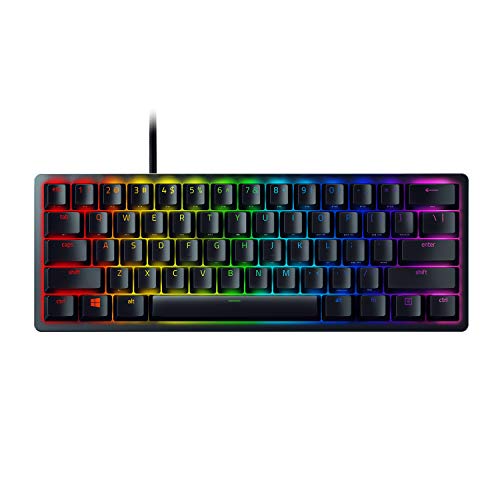
The Razer Huntsman Mini offers lightning-fast key response with its optical switches, making it perfect for gaming. Enjoy satisfying clicky feedback and customizable RGB lighting. It's a compact and stylish choice for tech-savvy families.
Best Selling Kids Keyboards
Below are some of the best selling children's keyboards for kids to learn how to type.
Bestsellers: childrens computer keyboard

Pink Gaming Keyboard and Mouse Combo - RGB Lighting Experience Experience mesmerizing RGB lighting with 3 dynamic modes on this pink gaming keyboard featuring membrane switches and multimedia function keys.

FOR PC & PS3 - The wireless PC/PS3 Guitar controller for an authentic music experience.

It can hold 1 headphone and 2 controllers at the same time, or 4 game controllers.

Multifunctional Storage Design: Carrying backpack for ps5 has four main compartments, the inside 2 separate compartment can store a PS5 console a 17.3-inch laptop, the front upper pocket can store PS5 discs, and the front lower big pocket can store two ps5 controllers, data cables, and charging cables.

The design of bunny ears gives it a three-dimensional look.

Note 1: This gaming headset is not suitable for xbox 360; Note 2: This gamer headset is not suitable for ps3 if you don't have a 3.5mm jack adapter; Note 3: The usb cable is only for led light power, 3.5mm cable is for sound.
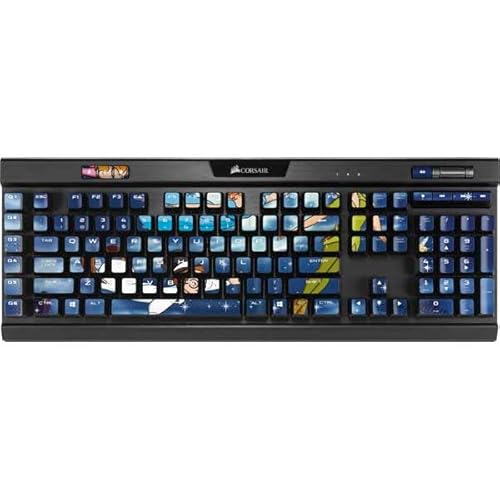
Officially Licensed Peter Pan Disney Skin compatible with K95 RGB PLATINUM Mechanical Gaming Keyboard.

Multi-device Connection: Ausdom 98Pro Wireless Mechanical Keyboard supports BT5.0, 2.4GHz wireless and USB wired connections, and you can use the FN+ key combination to switch between 5 devices to efficiently manage multiple devices and enhance work efficiency and entertainment experience.

Ideal gift for sons, boys, men and gamers.

Play 50+ Popular Roblox Games :Dive into a vast library of fun!
Frequently Asked Questions
The first thing to do when choosing a keyboard for your kids is to find out their preferences. You can also pick a keyboard based on your kid’s age, existing knowledge of keyboarding, purpose, and level of expertise. Other factors to look out for when choosing a keyboard for your kids are- ergonomics, performance, size, layout, and durability.
Yes. The keyboard performs multiple functions, including playing games and teaching how to code. Kids can play piano-related games on the keyboard or build a customized piano. While learning about piano, they can also learn about keyboarding and coding- using a stone to kill three birds!

Summary
There are countless things kids can learn on the keyboard. Actually, the keyboard is a passage for many amazing things kids can learn, such as coding, computer science, software, hardware, typing, gaming, and keyboarding.
In case you are skeptical about throwing your kids into the coding space with no prior experience, they can start with learning about the keyboard and the basics of programming. Whether you want to teach kids how to code or type, the keyboard for kids is a perfect avenue to begin!

More Coding Inspiration for Kids
- Code Ninjas - Is the coding program for kids worth it?
- Python for Kids - Parents Guide
- How to Explain Coding to Kids
- Overview About Arduinos for Kids
- Best Kids Computer Keyboards for Typing
- Teach Kids How to Code with Swift iOS App Programming Language
- Roblox Coding - Teach Kids how to Program
- Programmable Robots for Kids (to learn coding)
- Learn Coding without a Computer
- Offline Computer Coding and Programming Unplugged
- Best Coding Books for Kids by Age
- LEGO Programming for Kids with Mindstorm
Leave a Reply